Use Case: Verify Transfer Integrity
Scenario
An IT administrator receives USB drives from an air-gap transfer and needs to verify completeness and integrity before unpacking. The list command provides a diagnostic workflow for inspecting chunk inventory, checking checksums, and identifying missing or corrupted chunks.
Verify completeness and integrity of a chunked transfer before unpacking. Inspect: Run Verify: Run Diagnose: Identify missing or corrupted chunks. Request re-transfer of affected USBs from the source side. Acceptance Criteria: All chunks present, all checksums match, operator has confidence to proceed with unpack. |
Prerequisites
Transfer media: One or more USB drives received from a prior pack operation
Manifest:
airgap-transfer-manifest.jsonpresent on at least one USBAirGap Transfer: Installed on the receiving machine
Workflow Steps
Step 1: Inspect Chunk Inventory
Connect the first USB drive and run the list command:
airgap-transfer list /media/usb-drive
Output shows:
Chunk count and filenames (
chunk_000.tar,chunk_001.tar, …)Size of each chunk present on this USB
Estimated total transfer size
Which chunks are present vs missing
Step 2: Verify Checksums
Run verification to compute checksums and compare against the manifest:
airgap-transfer list /media/usb-drive --verify
For each chunk, the tool:
Reads the chunk file and computes its SHA-256 checksum
Compares against the checksum stored in the manifest
Reports match or mismatch
Step 3: Diagnose Issues
If the verification reveals problems:
Missing chunk: “chunk_002.tar: MISSING” — the USB with this chunk was not provided or was lost in transit. Request the specific USB from the source side.
Corrupted chunk: “chunk_001.tar: CHECKSUM MISMATCH” — the chunk was damaged during transfer. Request re-pack and re-transfer of the affected chunk.
All clear: “All 4 chunks verified successfully” — proceed to unpack.
Step 4: Proceed with Unpack
Once all chunks are verified:
airgap-transfer unpack /media/usb-drive ~/restored/
The unpack operation will re-verify checksums before extraction (unless --no-verify is specified), providing a second layer of integrity assurance.
Acceptance Criteria
All chunks accounted for in the manifest
All checksums verified against manifest values
Missing or corrupted chunks clearly identified with actionable messages
Operator has confidence to proceed (or knows exactly which USBs to re-request)
Error Scenarios
Error |
Cause |
Recovery |
|---|---|---|
“chunk_002: MISSING” |
USB with chunk not connected |
Connect correct USB |
“chunk_001: MISMATCH” |
Chunk corrupted during transfer |
Re-transfer from source |
“No manifest found” |
Manifest file missing or corrupt |
Use USB with valid manifest |
Linked Requirements
ID |
Title |
Status |
Release |
Verified By |
|---|---|---|---|---|
Display Chunk Inventory |
approved |
v1.0 |
||
Show Chunk Sizes and Manifest Status |
approved |
v1.0 |
||
Identify Missing Chunks |
approved |
v1.0 |
||
Display Estimated Total Size |
approved |
v1.0 |
||
Detect Corrupted Chunks |
approved |
v1.0 |
||
List Verify Flag |
approved |
v1.0 |
Traceability
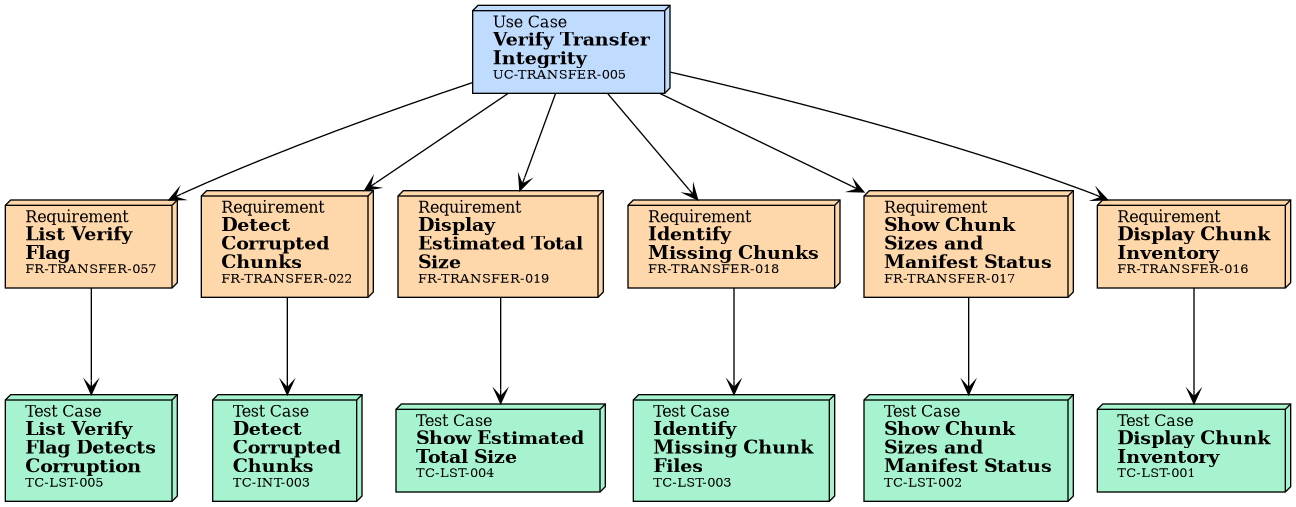
Tests
Integration Tests
No needs passed the filters
Unit Tests of Linked Requirements
ID |
Title |
Status |
Tests |
|---|---|---|---|
Detect Corrupted Chunks |
approved |
||
Display Chunk Inventory |
approved |
||
Show Chunk Sizes and Manifest Status |
approved |
||
Identify Missing Chunk Files |
approved |
||
Show Estimated Total Size |
approved |
||
List Verify Flag Detects Corruption |
approved |