Use Case: Protect Against Data Loss
Scenario
An IT administrator accidentally targets a directory containing existing files during an unpack operation. The tool’s safety features — overwrite protection, destination validation, and safe USB sync — prevent accidental data loss.
Prevent accidental data loss through overwrite protection, destination path validation, safe USB synchronization, and atomic write operations. Default behavior: Refuse to overwrite existing files or write to invalid destinations. Explicit override: The Safe media handling: USB writes are synced to ensure data is flushed to disk before ejection. Acceptance Criteria: No accidental data loss, clear warnings before destructive operations, safe USB handling. |
Prerequisites
Transfer media: USB drive(s) with a completed pack operation
Destination: Target directory on the destination machine
Workflow Steps
Scenario A: Overwrite Protection
1. Attempt unpack to an existing directory
airgap-transfer unpack /media/usb-drive ~/existing-project/
error: destination already contains files. Use --force to overwrite.
The tool refuses to write, protecting the existing data.
2. Operator reviews and corrects
The operator realizes they specified the wrong path:
airgap-transfer unpack /media/usb-drive ~/restored-project/
Transfer proceeds to the correct (empty) directory.
3. Or: intentional overwrite
If the operator intentionally wants to replace outdated files:
airgap-transfer unpack /media/usb-drive ~/existing-project/ --force
The tool overwrites existing files with the transferred data.
Scenario B: Pack to Occupied Destination
1. Attempt pack to a directory with an existing manifest
airgap-transfer pack ~/data/ /media/usb-drive
error: destination already contains a manifest. Use --force to overwrite or --resume to continue.
The tool detects a prior pack operation and stops. This prevents accidental overwrite of an in-progress transfer.
2. Operator chooses action
--resume: Continue the interrupted pack--force: Discard prior state and start freshNeither: Abort and investigate
Scenario C: Safe USB Ejection
1. Pack completes
airgap-transfer pack ~/data/ /media/usb-drive
After writing all chunks, the tool calls the platform’s filesystem sync to flush all buffered writes to the USB drive.
Syncing writes to /media/usb-drive...
Pack complete. Safe to eject USB drive.
2. Ejection without sync risks
Without the sync step, ejecting a USB immediately after a write could result in corrupted chunk files (data still in the OS write cache). The tool’s explicit sync eliminates this risk.
Acceptance Criteria
Existing files are never silently overwritten
Clear error messages explain what would be overwritten and how to proceed
--forceis an explicit opt-in, not a defaultUSB writes are flushed to disk before the tool reports completion
Atomic operations prevent partial state on unexpected termination
Error Scenarios
Error |
Cause |
Recovery |
|---|---|---|
“Destination contains files” |
Existing data at target path |
Choose different path or –force |
“Manifest already exists” |
Prior pack at same destination |
Use –resume or –force |
“Destination not writable” |
Permissions issue |
Fix permissions, retry |
Linked Requirements
ID |
Title |
Status |
Release |
Verified By |
|---|---|---|---|---|
Overwrite Protection |
approved |
v1.0 |
||
Validate Destination Paths |
approved |
v1.0 |
||
Sync USB Safely |
approved |
v1.0 |
||
Atomic Operations |
approved |
v1.0 |
||
Force Flag |
approved |
v1.0 |
Traceability
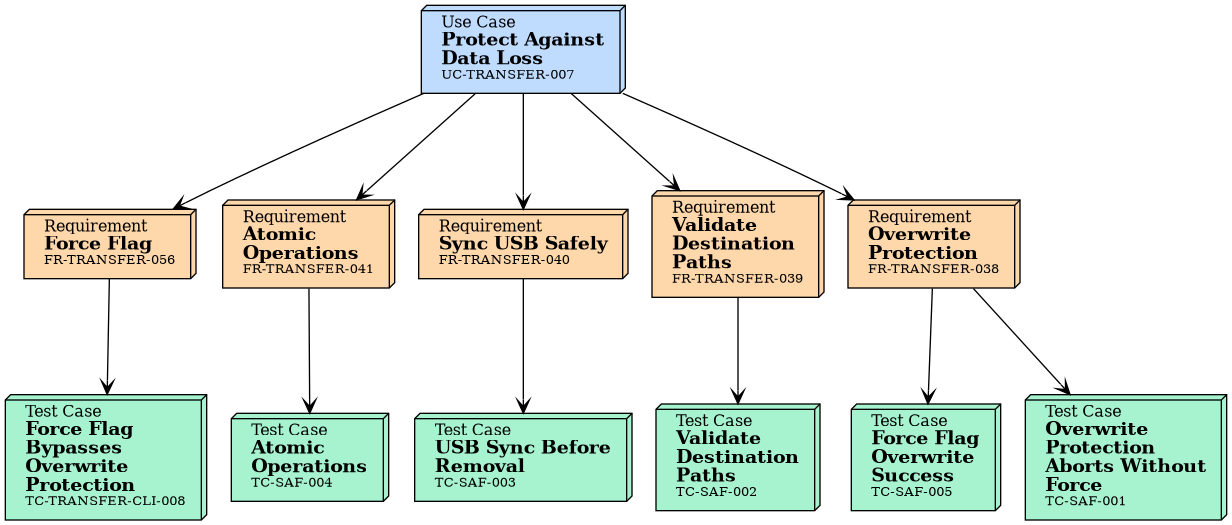
Tests
Integration Tests
No needs passed the filters
Unit Tests of Linked Requirements
ID |
Title |
Status |
Tests |
|---|---|---|---|
Overwrite Protection Aborts Without Force |
approved |
||
Validate Destination Paths |
approved |
||
USB Sync Before Removal |
approved |
||
Atomic Operations |
approved |
||
Force Flag Overwrite Success |
approved |
||
Force Flag Bypasses Overwrite Protection |
approved |